
DubBot Is Now Inside WordPress!
As a Web Editor at Providence College, you’ve learned how to use DubBot to review your pages — checking accessibility, broken links, spelling, and other issues — so you already know how helpful those reports are. Now you don’t have to leave WordPress to see them.
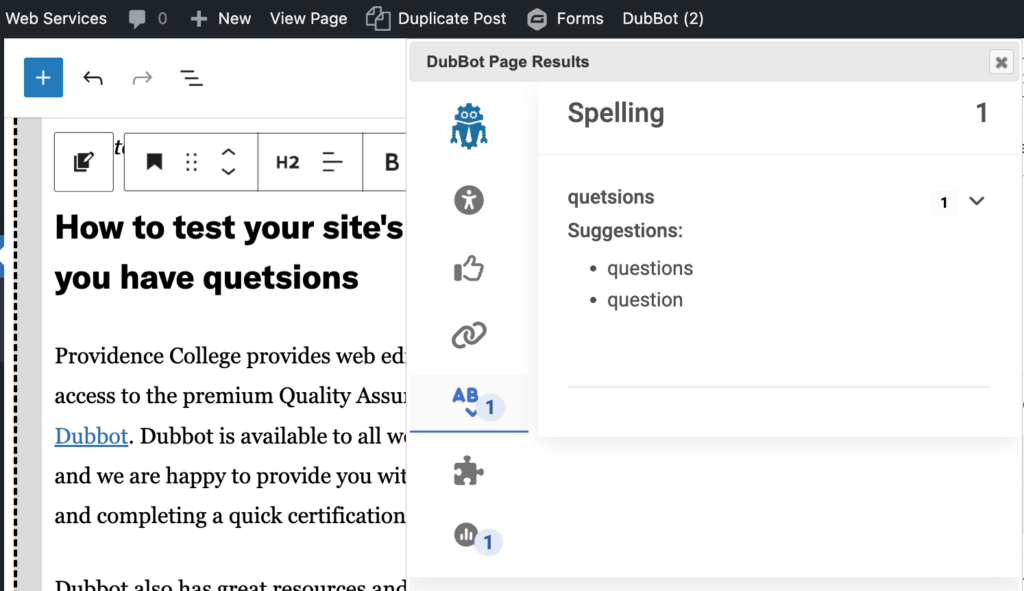
We’ve installed the new DubBot plugin, and it brings your page reports right into the WordPress editor dashboard. We’re activating the plugin site by site over the next few days.
See what needs attention on a given page without leaving WordPress. It’s a small quality-of-life improvement that can help you find issues while you’re in the right place to fix them, and your changes will be reflected on the next DubBot crawl (never more than a week away).
You already know how to use DubBot, you know what the checks mean, and you probably know how to fix them (if you don’t, assign the error as a task, and tag Web Services — we can help!). This doesn’t mean you shouldn’t check your full reports in DubBot regularly — you definitely should. This just makes issues a little easier to spot. Head over to the DubBot Plugin guide to see it in action and learn how it works. (Spoiler: it just works!)