

Providence College Web Editor News – March 2026

Welcome to Josh McCall – Senior Web & UX Developer

We’re delighted to announce that Josh McCall has joined Providence College’s Web Services team as our new Senior Web and UX Developer. He brings more than 15 years of WordPress expertise, and a demonstrated history of creating thoughtful, user-centered web experiences.
Josh comes to us with an impressive background working with clients primarily in the literary arts and higher education sectors, so he has experience with many of the unique challenges and opportunities we face in supporting our academic and creative communities online. Josh is also a part-time creative writing instructor at Salve Regina University.
With his extensive WordPress background, technical depth, and UX sensibility, we’re excited to add Josh to our small but mighty Web Services team. You’ll find him in Martin 302, and we encourage you to stop by to welcome him to campus.
Here’s to new beginnings and the great work ahead. Welcome, Josh!
PDF Remediation Project – Thank you to all

A big thank you to all Web Editors in regards to your prompt attention to the PDF Remediation project! Also a HUGE thank you to Kerri Hicks for her leadership, stewardship and endlessly helpful/positive attitude helping folks remediate their PDFs.
Through your combined efforts, PDFs on the Providence.edu sites have gone from 5,300 to 1,198 – PDFs that have been eliminated, migrated into web pages, or made accessible through your work. We appreciate your partnership in making the Providence.edu websites accessible, compliant, and helping our viewers access our content.
PDF Remediation Project By The Numbers

- Number of PDFs before the project kick off: approximately 5,300
- Number of PDFs TODAY: 1,198. There are still a handful of pdfs being remediated. If you haven’t completed your site’s remediation project yet, you must do so right away! As of 20 March 2026, Web Services will begin deleting inaccessible PDFs from your Media Library in WordPress!)
March Web Editor Survey
This month, we’d love to get your feedback about two of our powerhouse blocks, the Posts Block and the Slider Block. Please take four minutes to give us your feedback, it’s been incredibly helpful!
New Feature – Basic Traffic Analytics in DubBot
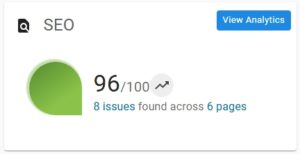
Interested in finding out how much traffic your site is receiving? A new feature we’ve just activated in DubBot is basic traffic analytics. If you log into DubBot and then look at your dashboard, under the SEO card you should see a small blue box “view analytics”. If you click on it, you’ll get a listing of basic traffic analytics for your site. The data is sortable and you can view the aggregate information using the following date ranges
- The last day
- Last week to date
- Last month to date
- Last year to date
Additionally, while in Page Preview, your analytic data is displayed in the SEO tab shown below.
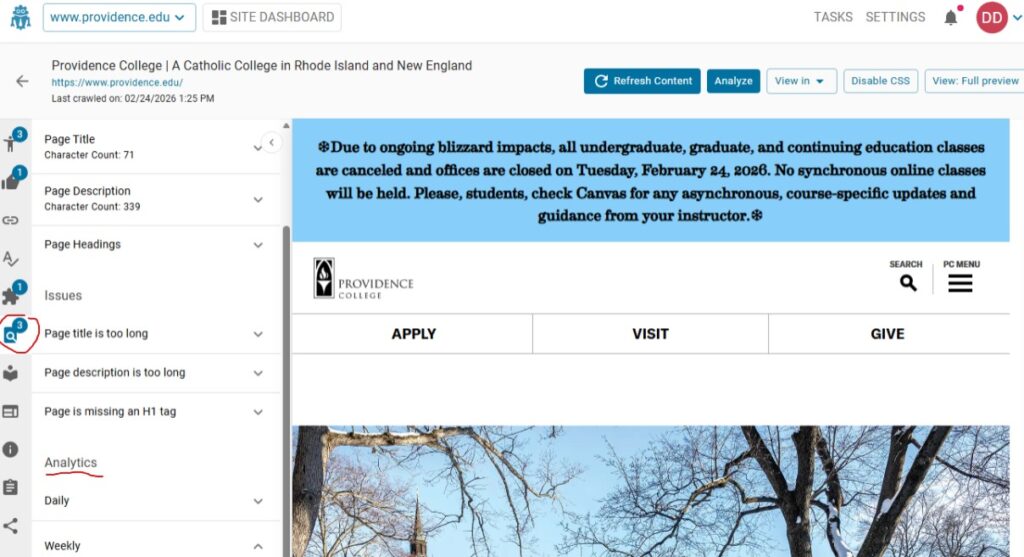
If you’d like a deeper dive into your sites analytics or are involved (or would like to get involved in) digital marketing, please contact Dan Demmons for assistance.
Image Format Change – Use WebP
If you’re uploading images to your website, there’s a better format you should be using: .webp.
WebP images are significantly smaller in file size than traditional formats like .jpg or .png—often 25–50% smaller – without sacrificing visual quality. Smaller images mean faster page load times, which improves user experience, boosts engagement, and even helps with search engine rankings.
Most modern browsers fully support WebP, and WordPress handles it seamlessly. By switching to WebP, you’re helping keep your site fast, efficient, and optimized for today’s web standards.
And it is easy- after you finish editing/sizing your image in Photoshop, go to the file menu and use “save as” and select the WebP format. The default settings are fine, and the hit save.
We will be changing our training documentation to reflect this change soon.
Scheduling Posts/Pages

Did you know you don’t have to publish content manually at the exact moment it goes live?
WordPress allows you to schedule pages and posts ahead of time, making it easy to plan announcements, news, or updates in advance.
Here’s how:
- In the WordPress editor, look for the “Publish” settings on the right-hand side in the Post/Page menu.
- Click the date/time field next to “Publish.”
- Choose your desired date and time.
- Click “Schedule” instead of Publish.
That’s it—WordPress will automatically publish your content at the scheduled time.
Why it matters: Scheduling helps you stay organized, coordinate with campus communications, and ensure content goes live exactly when it should – even if you’re not at your computer.